Unsafe state in a deadlock-avoidance system, Operating System

Assignment Help:

Question:

A set of processes are in a deadlock state when every process in the set is waiting for an event that can be caused by only another process in the set.

(a) There exists three different ways that an operating system can use to deal with deadlock situations. Identify the three methods, and explain how they can be used to deal with processes that are deadlocked.

(b) Assume that a system always require additional information about how resources are being requested for each process before making a decision on whether to grant the request or not to grant the request. One possible reason for not granting the request is because it can put the system in an unsafe state.

I. What is the difference between a safe state and an unsafe state in a deadlock-avoidance system?

Consider a system with 12 magnetic tape drives and 3 processes: P0, P1, P2. Process P0 requires 10 tape drives, process P1 may need as many as 4, and process P2 may need up to 9 tape drives. Suppose that at time t0, the processes are holding 5, 2 and 2 tape drives respectively, as illustrated in the table below:
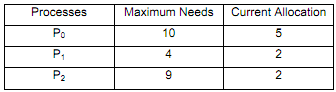
5_Deadlock-avoidance system.png

II. Is the system in a safe state at time t0? Clearly explain your answer.

III. Suppose that at time t1, process P2 requests and is allocated 1 more tape drive. Now, will this allocation put the system in a safe or unsafe state? Clearly explain your answer.


Related Discussions:- Unsafe state in a deadlock-avoidance system

Define a program that is in execution is known as, Define a program in exec...

Define a program in execution is known as A program in execution is known as a process

What is meant by context switch, What is meant by context switch? Switc...

What is meant by context switch? Switching the CPU to another process needs saving the state of the old process and loading the saved state for the latest process. This task is

Write about critical regions and monitors, Write about critical regions and...

Write about critical regions and monitors. Critical region definition Monitor definition Implementation of the conditional-region construct Syntax of monitor Monito

Illustrate the operating system components, Q. Illustrate the Operating Sys...

Q. Illustrate the Operating System Components? Modern operating systems share the goal of supporting system components. System components are: 1.  Process Management 2.

Important system components, Organizational, Structural, Logical and Execut...

Organizational, Structural, Logical and Execution Relationships Between Important System Components in Linux Kernel Subsystems A. Description of the Project You are require

Explain fixed partitioning in memory management, FIXED PARTITIONING Us...

FIXED PARTITIONING Using fixed partitioning we are able to allocate the memory Here we are dividing the memory into a few fixed partitions.Every partition may not be of the si

Explain about error detection method, Q. Explain about Error detection meth...

Q. Explain about Error detection method? Error detection: error can occur in CPU, in I/O devices or in memory hardware. Operating system constantly needs to be aware of possi

Describe the purpose of the open and close operations, Q. Describe the pur...

Q. Describe the purpose of the open() and close() operations. Answer: The open() operation notifies the system that the named file is about to become active. The c

Memory Management Problems, Sir i want formulas in Memory management starti...

Sir i want formulas in Memory management starting from paging till the demang paging in a easy manner for solving problems in competitive exams

Backup and recovery, what is it all about? why do we need? what are the typ...

what is it all about? why do we need? what are the types of backup? how is it done in unix?

Write Your Message!

Captcha
Free Assignment Quote

Assured A++ Grade

Get guaranteed satisfaction & time on delivery in every assignment order you paid with us! We ensure premium quality solution document along with free turntin report!

All rights reserved! Copyrights ©2019-2020 ExpertsMind IT Educational Pvt Ltd