True color matrice - image processing, MATLAB in Engineering

Assignment Help:

True color matrice:

The true color matrices are the other way to represent images. The true color matrices are 3-dimensional matrices. The first two coordinates are the coordinates of pixel. The third index is the color component; (:,:,1) is the red, (:,:,2) is the green, & (:,:,3) is the blue component. Each and every element in the matrix is of the type uint8 that is an unsigned integer type by using 8 bits. With 8 bits, 28 (or 256) values can be stored and therefore the range of values is 0 to 255. The minimum value, 0, shows the darkest hue available so all 0's answers in a black pixel. The maximum value, 255, shows the brightest hue. For illustration, when the values for a given pixel coordinates px and py (px,py,1) is 255, (px,py,2) is 0 and (px,py,3) is 0 then that pixel will be bright red. All 255's outcomes in a white pixel.

The image function shows the information in the 3-dimensional matrix as an image.

For illustration, this generates a 2× 2 image as shown in figure below. The matrix is 2×2×3, where the third dimension is the color. The pixel in position (1,1) is red, the pixel in position (1,2) is blue, the pixel in position (2,1) is green, and the pixel in position (2,2) is black.


>> mat(1,1,1) = 255;

>> mat(1,1,2) = 0;

>> mat(1,1,3) = 0;

>> mat(1,2,1) = 0;

>> mat(1,2,2) = 0;

>> mat(1,2,3) = 255;

>> mat(2,1,1) = 0;

>> mat(2,1,2) = 255;

>> mat(2,1,3) = 0;

>> mat(2,2,1) = 0;

>> mat(2,2,2) = 0;

>> mat(2,2,3) = 0;

>> mat = uint8(mat);

>> image(mat)
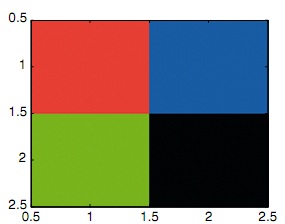
673_true color matrixc.png


Related Discussions:- True color matrice - image processing

For loop, FOR Loop: The for loop, or the for statement, is used whenev...

FOR Loop: The for loop, or the for statement, is used whenever it is essential to repeat statement(s) in the script or function, and whenever it is known ahead of time how man

Forward substitution, Forward substitution: The Forward substitution (...

Forward substitution: The Forward substitution (done methodically by first getting a 0 in the a 21 place, and then a 31 , and lastly a 32 ): For the Gauss technique,

Function cellplot - cell array, Function cellplot - Cell array: The fu...

Function cellplot - Cell array: The function cellplot place a graphical display of the cell array in a figure Window; though, it is a high-level view and fundamentally just di

Graphics properties, Graphics Properties: The MATLAB uses the Handle G...

Graphics Properties: The MATLAB uses the Handle Graphics in all its figures. All figures consist of various objects, each of which is assigned a handle. The object handle is a

Example of exponential function modular program, Example of Exponential fun...

Example of Exponential function modular program: In order to view the distinction in the approximate value for e as n increases, the user kept choosing Limit & entering larger

Function strncmp, Function strncmp: The function strncmp compares only...

Function strncmp: The function strncmp compares only the first n characters in the strings and ignores the rest. The initial two arguments are strings to compare, and third ar

Finding products by for loop, Finding products by for loop: an illustr...

Finding products by for loop: an illustration, when 5 is passed to be the value of the input argument n, the function will compute and return 1 + 2 + 3 + 4 + 5, or 15: >> s

Num2str function - string, num2str function: The num2str function, tha...

num2str function: The num2str function, that converts real numbers, can be called in many ways. If only the real number is passed to the num2str function, it will generate a s

Indexing into vectors of structures, Indexing into Vectors of structures: ...

Indexing into Vectors of structures: Frequently, when the data structure is a vector of structures, it is essential to iterate through the vector in order by various fields. F

Algorithm for the function explaine, Algorithm for the function explaine: ...

Algorithm for the function explaine: The algorithm for the function explaine is as shown:  Print a description of e, the exp function, and how to find the approximate va

Write Your Message!

Captcha
Free Assignment Quote

Assured A++ Grade

Get guaranteed satisfaction & time on delivery in every assignment order you paid with us! We ensure premium quality solution document along with free turntin report!

All rights reserved! Copyrights ©2019-2020 ExpertsMind IT Educational Pvt Ltd