Java output and input is described in terms of an abstract concept named a "stream", which is a sequence of data.
There are 2 types of streams.
1. Byte streams (8 bit bytes) Abstract classes are: OutputStream and InputStream
2. Character streams (16 bit UNICODE) Abstract classes are: Writer and Reader
java.io.* classes need the decorator design pattern. The decorator design pattern added responsibilities to objects at runtime. Decorators are more reliable than inheritance because the inheritance added responsibility to classes at compile time. The java.io.* classes access the decorator pattern to construct different combinations of behavior at runtime based on some basic classes.
The new I/O (NIO) offers better performance and better scalability?
Java has long been not suited for deploying programs that perform a lot of I/O functions. Furthermore, commonly needed tasks such as non-blocking, file locking and asynchronous I/O operations and ability to map file to memory were not require. Non-blocking I/O operations were found through work around such as multithreading or using JNI. The New I/O API in J2SE 1.4 has modified this situation.
A server's ability to handle several client requests effectively depends on how it performs I/O streams. When a server has to communicate hundreds of clients simultaneously, it has to be able to use I/O services frequently. One way to cater for this scenario in Java is to use threads but having almost one-to-one ratio of threads (100 clients will have 100 threads) is prone to enormous thread overhead and may give in scalability and performance problems due to consumption of memory stacks and CPU context switching. To overcome this situation, a new set of non-blocking I/O classes have been produced to the Java platform in java.nio package.
The non-blocking I/O mechanism is making around Channels and Selectors. Channels, Selectors and Buffers are the core of the NIO.
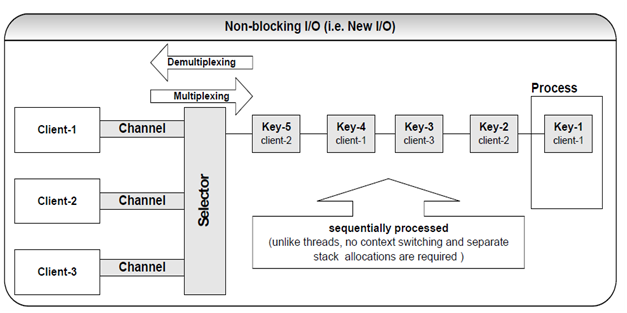
A Channel class presents a bi-directional communication channel in between datasources such as a file, a socket, or an application component, which is capable of producing one or more I/O operations such as writing or reading. Channels may be non-blocking, which means, no I/O operation can wait for data to be written or read to the network. The nice thing about NIO channels is that they may be closed and asynchronously interrupted. So if a thread is blocked in an I/O operation on a channel, another thread may interrupt that blocked thread.