Steps for clip a line segment-pq, Computer Graphics

Assignment Help:

Steps for clip a line segment-PQ

  • Initially, find all the points of intersections of the line segment PQ along with the edges of the polygonal window and describe them either as PE and PL points. Also find out the value of parameter t, by using equation (2) for respective PE's and PL's.

                                                            Or

If value of the normal to particular edges is not specified then, determine the value of normal to every edge of the window, then find out the value of parameter t, by using equation (2) for particular point of intersection among line segment and window edge then on the basis of the value of parameter t mark them like PE and PL given the value of t lies from 0 to 1 in magnitude.

  • Secondly, out of the diverse values of t for PE's find out the maximum value of t say it is tmax. Likewise, out of the diverse values of t for PL's find out the minimum value of t say it be tmin . Remember here that for clipping to be possible tmin > tmax.
  • at last, vary the parameter t from tmax to tmin and find out the clipped line as outcome.

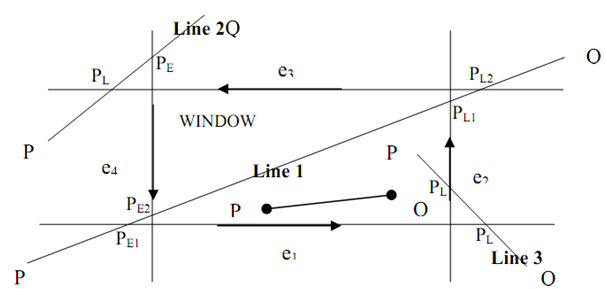
For well understanding of steps here figure is shown below:
2071_Steps for clip a line segment-PQ.png

Figure: Steps of Cyrus Beck Clipping

During in case of Line 1: (PQ)

1) Point 1 is potentially entering (PE1) since as we move along PQ, the LHS of e1 is window and hence, it seems that we are entering the window.

2) Point 2 is again PE2 same as point 1.

3) Point 3 is potentially leaving (P4) ? as we move along PQ, the LHS of e2 is window and hence, it seems that we are leaving the window.

4) As the same, point 4 is also PL2.

Line 2 and 3 (PQ):

By using similar logic as for line 1 we determine p‾L and PE. Here, it is to be noted that for all points of intersection we have several value of t.

Say t1 is value of t for PE1

Say t2 is value of t for PE2

Say t3 is value of t for PL1

Say t4 is value of t for PL2


Related Discussions:- Steps for clip a line segment-pq

Determine the transformation matrix for cavalier projection, Determine the ...

Determine the transformation matrix for: a) Cavalier projection with θ=45 0 , and b) Cabinet projection with θ=30 0    c) Draw the projection of unit cube for all transfor

Multimedia tool features, Multimedia Tool Features General to nearly a...

Multimedia Tool Features General to nearly all multimedia tool platforms are various features for encapsulating the content, presenting the data, acquiring user input and cont

Multimedia applications, what are activities to be undertaken or executed a...

what are activities to be undertaken or executed and the expected output of each activity for a plan creation of a movie?

Distinguish between bitblt and pixblt, Distinguish between bitBlt and pixBl...

Distinguish between bitBlt and pixBlt?  Raster functions that manipulate rectangular pixel arrays are usually referred to as raster ops. Moving a block of pixels from one locat

Image precision and object precision, Q.   What do you mean by image precis...

Q.   What do you mean by image precision and object precision? Describe z- buffer algorithm for visible surface detection. OR What do you mean by image precision and obj

Illustrate the advantages of using virtual reality, Illustrate the Advantag...

Illustrate the Advantages of using virtual reality - it's safer (As techniques can be tried out in advance without the dangers of real operation for example maintaining a nucle

Advantages of the z-buffer method, Advantages of the z-buffer method:      ...

Advantages of the z-buffer method:              1) The z-buffer method or algorithm is easy to apply and it needs no sorting of surface in a scene. 2) In z-buffer algorithm

What is run length encoding, What is run length encoding?   Run length ...

What is run length encoding?   Run length encoding is a compression method used to store the intensity values in the frame buffer, which keeps each scan line as a set of intege

Algorithms for filled-area primitives, Algorithms for filled-area primitive...

Algorithms for filled-area primitives These algorithms are classified into two categories (i)  Scan line algorithms (ii) Seed fill algorithms.

Write Your Message!

Captcha
Free Assignment Quote

Assured A++ Grade

Get guaranteed satisfaction & time on delivery in every assignment order you paid with us! We ensure premium quality solution document along with free turntin report!

All rights reserved! Copyrights ©2019-2020 ExpertsMind IT Educational Pvt Ltd