State in a deadlock-avoidance system, Operating System

Assignment Help:

Question:

In a deadlock, processes never finish executing and system resources are tied up, preventing other jobs from starting. Deadlocks can be characterised by a set of conditions.

a) Describe the four necessary conditions that must hold simultaneously in a system for a deadlock situation to arise.

b) One way of handling deadlock situations is by using a deadlock-avoidance algorithm: Consider that a system always require additional information about how resources are being requested for every process before making a decision on whether to grant the request or not to grant the request. One possible reason for not granting the request is because it will put the system in an unsafe state.

What is the difference between a safe state and an unsafe state in a deadlock-avoidance system?

c) Consider a system with 12 magnetic tape drives and 3 processes: P0, P1, P2. Process P0 requires 10 tape drives, process P1 may need as many as 4, and process P2 may need up to 9 tape drives. Suppose that at time t0, each process is holding 5, 2 and 2 tape drives respectively. This can be illustrated in the table below:
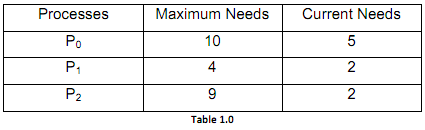
1246_Difference between a safe state and an unsafe state.png

i. Is the system in a safe state at time t0? Clearly explain your answer.

ii. Suppose that at time t1, process P2 requests and is allocated 1 more tape drive. Now, will this allocation put the system in a safe or unsafe state? Clearly explain your answer.


Related Discussions:- State in a deadlock-avoidance system

Explain the concept of reentrancy, Explain the concept of Reentrancy? I...

Explain the concept of Reentrancy? It is a useful, memory-saving method for multiprogrammed timesharing systems. A Reentrant Procedure is one in which many users can share a si

Briefly explain about file system implementation, Briefly explain about fil...

Briefly explain about file system implementation? Several on-disk and in-memory structures are used to execute a file system. On disk, the file system may have information abou

Explain root partition, Explain root partition The root partition,which...

Explain root partition The root partition,which have the operating-system kernel and potentially other system files, is mounted at boot time. In successful mount operation, ope

Unsafe state, discuss unsafe state in operating system

discuss unsafe state in operating system

Definition of operating system, Q. Definition of Operating System? Defi...

Q. Definition of Operating System? Definition of Operating System: • An Operating system is a program which controls execution of application programs and acts as an interfa

What is the resident set and working set of a process, What is the resident...

What is the resident set and working set of a process? Resident set is that portion of the process image that is actually in real-memory at a certain instant. Working set is th

Write a short note on memory management, Write a short note on Memory manag...

Write a short note on Memory management. Memory management includes reallocating and allocating the memory space. The kinds of allocation of memory FIXED PARTITIONING

Nachos oprating system assignment, i am just wondering if you have expert i...

i am just wondering if you have expert in nachos operating system thank you

Explain clustered file organization, Clustered file organization A cl...

Clustered file organization A clustered file is also called a B-tree-clustered file is a tree-structured file in which records with adjacent index values are clustered toget

Define buffering, Define buffering. A buffer is a memory area that keep...

Define buffering. A buffer is a memory area that keeps data whereas they are transferred among two devices or among a device and an application. Buffering is done for three rea

Write Your Message!

Captcha
Free Assignment Quote

Assured A++ Grade

Get guaranteed satisfaction & time on delivery in every assignment order you paid with us! We ensure premium quality solution document along with free turntin report!

All rights reserved! Copyrights ©2019-2020 ExpertsMind IT Educational Pvt Ltd