Size - picture clause, COBOL Programming

Assignment Help:

Size:

The number of characters or digits needed to store the data item in the memory in termed as the Size of the data item.

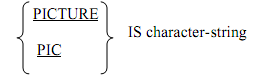
All the 4 general characteristics explained can be specified through a PICTURE clause. The clause PICTURE is to be followed by a picture character string as shown below.
663_Size.png

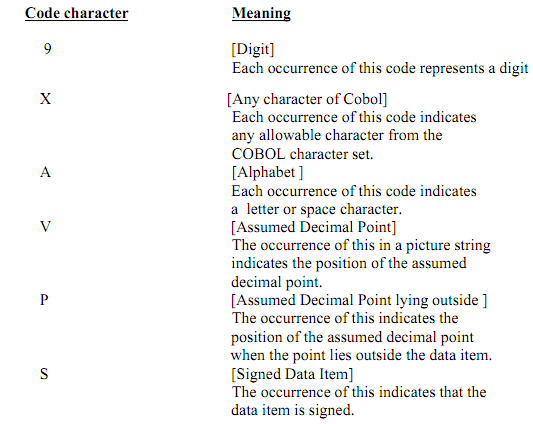
The character string can contain 1 to 30 code characters which define the above mentioned attributes of the elementary item. The code characters and meaning are shown below:
701_Size1.png

There is no exceptional code to indicate the size.

The total number of occurrence of 9, X or A in the picture string specifies the size.

The occurrence of V, P & S are not counted in determining the size of an item.

The permissible combinations are governed by the rules as shown below:

(i)  In the case of an alphabetic item the picture may hold only the symbol A.

(ii)  In the case of a numeric item the picture may hold only the symbols 9, V, P & S.

These are known as operational characters. It should hold at least one 9. 

The symbols V and S can appear only once and S, if it is involved, should be the leftmost character of the picture string. The symbol P can be repetitive on the right or on left as many times as is needed to indicate the position of the assumed decimal point.

(iii) In the case of an alphanumeric item, the picture may hold all Xs or the combination of 9, A and X (except all 9 or all A). In the afterward case the item is considered as if the string holds of all Xs.

The picture clause is only to be specified for the elementary items; it cannot be used for a group item. 

The size of a group item is equivalent to the total of the sizes of all the subordinate elementary items. The group item class is alphanumeric. 


Related Discussions:- Size - picture clause

Occurs - indexed by program, OCCURS - INDEXED BY PROGRAM: identificati...

OCCURS - INDEXED BY PROGRAM: identification division. program- id. searching. environment division. data division. working-storage section. 01 table1.      0

Illustration of multiply verb, Illustration of Multiply verb: (a)  MUL...

Illustration of Multiply verb: (a)  MULTIPLY A BY B. In this situation the value of A & B will be multiplied and the product will be stored in B.  The decimal point locatio

Level numbers - cobol programming, LEVEL NUMBERS: The COBOL makes use ...

LEVEL NUMBERS: The COBOL makes use of the level number concept to explain the hierarchical data structure. A level number is a 2 digit number. The permitted level numbers a

Example of open statement, Example of Open statement: Illustration: ...

Example of Open statement: Illustration: The OPEN INPUT TRANSACTION, OLD-MASTER OUTPUT NEW-MASTER. The illustration represents that there are two input files named the

Blank when zero - edit characters for numeric data, BLANK WHEN ZERO: ...

BLANK WHEN ZERO: BLANK WHEN ZERO is an editing clause that may be used along with a picture. This will set the whole data item to blanks of its value is equal to zero. Though,

Second form of divide verb, Second form of Divide verb: The second for...

Second form of Divide verb: The second form of this verb is as shown below: In this situation the identifier-1 or numeric- literal-1 will be divided by identifier-2 or

Write statement - indexed files, WRITE STATEMENT: The records are wri...

WRITE STATEMENT: The records are written to be logical place as determined from the value of the record key. The INVALID KEY condition occurs in the cases shown below: (i)

Add verb, ADD VERB: The ADD Verb can be used to find the sum of two or ...

ADD VERB: The ADD Verb can be used to find the sum of two or more numbers and to store the sum.  The ADD verb takes any one of the two forms as shown below:

Perform with varying option, PERFORM WITH VARYING OPTION: The format i...

PERFORM WITH VARYING OPTION: The format is as shown below:

Sequential file creation and rewriting, SEQUENTIAL FILE CREATION AND REWRIT...

SEQUENTIAL FILE CREATION AND REWRITING: We have to write a program to create a student file with just two fields: sno i.e. Student Number and same i.e. Student Name. Add a few

Write Your Message!

Captcha
Free Assignment Quote

Assured A++ Grade

Get guaranteed satisfaction & time on delivery in every assignment order you paid with us! We ensure premium quality solution document along with free turntin report!

All rights reserved! Copyrights ©2019-2020 ExpertsMind IT Educational Pvt Ltd