Satellite assemblies, DOT NET Programming

Assignment Help:

What are satellite assemblies?

We use resource files to store data according to the localized languages. But when you actually go for the deployment you will not like to also install the "resx" or "txt" files. It is definitely not a good deployment practice to install the data which can be easily modified. In brief somehow we should install this in a binary format so that no end user can modify it. That's why the Microsoft introduced satellite assemblies.

The Satellite assemblies are assemblies which do not contain any source code. They contain only resource files. You can create a satellite assembly by using rsgen.exe and al.exe. They are in the binary DLL format which makes it easier to ship it during deployment. So finally during deployment you do not require to ship the resx files but only the compiled satellite DLL.
789_Satellite assembly.png

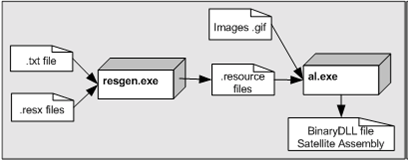
Figure: - resgen.exe and al.exe in action

The above diagram above will give you a whole picture of how to generate Satellite assembly. You can see from the above figure we require two exe resgen.exe & al.exe. Whenever you made your resx file or text file you must first convert it into a ".resource" files. This is completed by using the resgen.exe. The command snippet below is for resgen.exe where the LoginScreen.aspx.el.resx is the resx file and output is a Greek.resources file.  It always generates the "LoginScreen.resources" if you do not give the output file name.

resgen LoginScreen.aspx.el.resx Greek.resources

You can also create resx files from the txt file by using resgen.exe below is the code snippet for the same:-

resgen MyLanguage.txt MyLanguage.resx

In the above command snippet we will generate a MyLanguage.resx by using MyLanguag.txt file. You can make a DLL by using resource files and not resx so you must make this conversion. Now once the resource file is created its time make the compiled assembly of the same so that it can be shipped during the deployment. This is carry out by using the assembly linker tool al.exe given by the Microsoft. The command code snippet is below for the same.

al.exe /out:el.dll /c:de /embed:greek.resources


Related Discussions:- Satellite assemblies

Need help in crm and shaerpoint, CRM and Shaerpoint We are using 365+ CR...

CRM and Shaerpoint We are using 365+ CRM in the cloud for QuattroCitta at the moment which we will migrate to our own private cloud in six months (project part 2). Within ShareP

Difference between system exceptions and application excepti, What is the d...

What is the difference between System exceptions and Application exceptions? All exception is derived from Exception Base class. Exceptions are generated programmatically or ca

Difference between "optimistic" and "pessimistic" locking, What's differenc...

What's difference between "Optimistic" and "Pessimistic" locking? In the pessimistic locking when user wants to update a data it locks the record and till then no one can updat

How to use activex control in .net, How to use ActiveX Control in .Net ? ...

How to use ActiveX Control in .Net ? ActiveX control is a special type of COM component  that supports a User Interface. Using ActiveX Control in your .Net Project is even

Development of online game, Project Description: Online game development...

Project Description: Online game development 1. Online Live Baccarat Game is required - server program(IOCP or ect..). - 2D graphic design. - client program. - we

How to access attributes using "xmlreader", How do we access attributes usi...

How do we access attributes using "XmlReader"? The below snippets represents the way to access attributes. At First in order to check whether there any attributes present in th

What is manifest, Manifest Assembly metadata is always stored in the Ma...

Manifest Assembly metadata is always stored in the Manifest. Manifest consists of all metadata required to do the following things: 1) Version of assembly 2) Security ident

What is machine.config, What is Machine.config?  Machine configuration ...

What is Machine.config?  Machine configuration file: The machine. config file have settings that apply to the entire computer. This file is located in the %runtime install path

Pareto principle, What is pareto principle? The Pareto principle also p...

What is pareto principle? The Pareto principle also paraphrased as 80/20 principle is simple effective problem tackling way in the management. It says that 20% of your problems

Write Your Message!

Captcha
Free Assignment Quote

Assured A++ Grade

Get guaranteed satisfaction & time on delivery in every assignment order you paid with us! We ensure premium quality solution document along with free turntin report!

All rights reserved! Copyrights ©2019-2020 ExpertsMind IT Educational Pvt Ltd