Program for computing automobile repair bills, Visual Basic Programming

Assignment Help:

A program is needed to assist computing automobile repair bills.

The cost of labor is $35 per hour.

The costs for parts are subject to a 5% sales tax, which should be added to the parts cost.

The console program should first prompt the user with:

Please enter Customer name, or 'quit' to end:

If the user enters a non-empty string (other than 'quit'), then the user should be prompted as follows (with responses after each prompt):

Please enter Hours of Labor:

Please enter cost of parts:

The bill for the customer should then be printed to the screen, as shown below in the sample output

When the user enters "quit" using ANY combination of upper-or-lower case letters, or simply presses the key, the overall total bill and number of customers should be printed, and the program then end, as shown in the same output below:
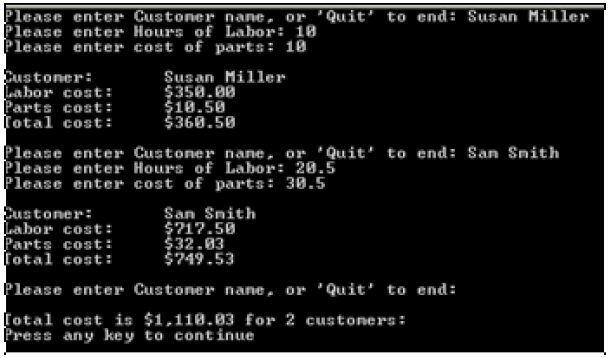
 

1607_Program for Computing Automobile Repair Bills.png

Use a constant for the labor rate and sales tax.

Spacing for customer name through total cost for a customer bill should be tabbed.

Build both a C# and Visual basic Program.

Run them both using the following data for input:

Customer name Hours of Labor Cost of Parts

Linda Payne 20 30

John Myer 15.5 25.5

Susan Branda 18 30

End program by entering "quit" for user name

Use compound arithmetic operators where appropriate.

Use a pretest loop for your processing in Main processing (with a priming read).


Related Discussions:- Program for computing automobile repair bills

Programming, i have connected my visual basic 2010 express in ports and use...

i have connected my visual basic 2010 express in ports and use it to send sms but it failed... now my teacher said that i have to use my LAN not port to send it instead..... please

Fixed length strings, Fixed length strings: The Fixed length strings ar...

Fixed length strings: The Fixed length strings are declared by identifying the size of the string. For illustration to give a length of 20 for the string place, the declarati

Cdatabase class - database application, Cdatabase Class: The CDataBase...

Cdatabase Class: The CDataBase class helps to connect to the data source. The Open member function opens a connection to the data source. CRecordset class is used for performi

Steps for creating a multiple document interface (mdi) form, Steps for Crea...

Steps for Creating A MDI Form: 1. Build a new form and set IsMdiContainer property to true. 2. Build a child form class to add to the form. 3. Now Right click the proj

Variant subtypes, Beyond the simple string or numeric classifications, Vari...

Beyond the simple string or numeric classifications, Variant can make added distinctions regarding the specific nature of numeric information. For instance, you can have numeric in

Create a calculator application, Create a VB calculator application that ap...

Create a VB calculator application that appears as in the screen shots below. The user enters numbers in the textboxes labelled Number 1 and Number 2. When a calculati

Benefits of using dynamic link library, Benefits of Using DLLs: The dy...

Benefits of Using DLLs: The dynamic linking has the following advantages which are as shown below: It saves memory and decreases the swapping. Many processes can use a s

Help context property, Sets or returns context ID for topic in Help File. I...

Sets or returns context ID for topic in Help File. If Help file is indicated in the VBScript Err Object HelpFile Property, the HelpContext property is utilized to display automatic

Create an application, 1. Create a new solution file named Ch03HandsOnProje...

1. Create a new solution file named Ch03HandsOnProject1. 2. Rename the form and set the filename of the form to frmMain and frmMain.vb, respectively. 3. Set the appropriate p

Write Your Message!

Captcha
Free Assignment Quote

Assured A++ Grade

Get guaranteed satisfaction & time on delivery in every assignment order you paid with us! We ensure premium quality solution document along with free turntin report!

All rights reserved! Copyrights ©2019-2020 ExpertsMind IT Educational Pvt Ltd