Packet processing on vpn router, Computer Networking

Assignment Help:

Consider the site-to-site VPN scenario shown in Figure 2. Let's deploy the AH protocol on the two VPN routers so that no desktop on the two sites need to do any AH operations. Assume Alice's desktop is on VPN Site 1 while Bob's desktop is on VPN site 2. Assume the IP address of Alice's desktop is 130.2.3.244; the IP address of Bob's desktop is 166.100.66.2.
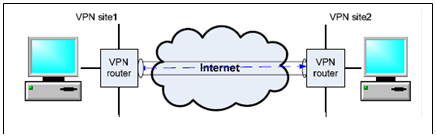
1268_Packet processing on VPN router.png

When Alice sends message "Stock X price $29" to Bob, the message sender program running on Alice's desktop needs to firstly compose the packet. Please draw the whole packet.

 After a while, the packet will arrive at the VPN router on site 1. After the packet is processed by the VPN router according to the AH protocol, it will be sent out from the VPN router. When the packet leaves the VPN router on site 1, what does the packet look like? Please draw the whole packet. Please note that we assume the VPN router does not enforce the ESP protocol - no tunneling.

Let's assume there is a bad guy named Mallory who can intercept this packet in the Internet between these two VPN routers. When this packet is intercepted by Mallory, can Mallory know what the message is? Why?

After a while, the packet will arrive at the VPN router on Site 2. When the packet is processed by the VPN router on Site 2, what will the VPN router do? Please give a step-by-step answer.

To enforce an IP spoofing attack, Mallory will change the header of the packet before it arrives at the VPN router on Site 2. In particular, Mallory will replace the source IP with 130.2.8.3. Can this IP spoofing attack fool the VPN router on Site 2? Why? Note that Mallory will try his best to fake a hash to fool the VPN router.

If the IP spoofing attack mentioned in Question 1.5 is launched by a colleague employee of Alice inside Site 1, Can this IP spoofing attack fool the VPN router on Site 2? Why?


Related Discussions:- Packet processing on vpn router

What are the key benefits of layered network, What are the key benefits of ...

What are the key benefits of layered network? Main advantages of layered network are given below: a) Complex systems can be split into understandable subsystems. b) Any f

Determine the definition of hdlc, Determine the definition of HDLC HDLC...

Determine the definition of HDLC HDLC has only one address field. In a LAN, any station may transmit to any other station. The receiving station needs to see its own address in

Two commands that copies the configuration in nvram to ram, Recognize the t...

Recognize the two commands that copies the configuration in NVRAM to RAM Ans) a) Copy startup-config running-config b)  Configure memory

Name the steps included in creating the checksum, List the steps included i...

List the steps included in creating the checksum. a. Separate the data into sections b. Add the sections together using 1's complement arithmetic c. Take the complement o

Dns - protocol attacks, DNS - Protocol Attacks Generally, in the DNS p...

DNS - Protocol Attacks Generally, in the DNS protocol, flaws are based on the implementation issues. The three common issues are generally, associated which can be of one of t

What is bit stuffing, What is Bit Stuffing? Bit stuffing is the process...

What is Bit Stuffing? Bit stuffing is the process of adding one extra 0 whenever five consecutive is follow a 0 in the data, so that the receiver does not mistake the pattern 0

Distributed route computation, In distributed routing computation, every pa...

In distributed routing computation, every packet switch calculates its routing table locally and transmit messages to the neighbors. It also updates information regularly. If a pac

Frequency division multiplexing, Frequency Division Multiplexing Frequ...

Frequency Division Multiplexing Frequency  division  multiplexing (FDM) is an analogy technique that can be applied when the bandwidth of a link is greater than the combined b

Physical addressing in a wan, PHYSICAL ADDRESSING IN A WAN:  The physi...

PHYSICAL ADDRESSING IN A WAN:  The physical addressing in a WAN is same as in LAN in the following way: The data is send in packets equivalent to frames. Every pack

Write Your Message!

Captcha
Free Assignment Quote

Assured A++ Grade

Get guaranteed satisfaction & time on delivery in every assignment order you paid with us! We ensure premium quality solution document along with free turntin report!

All rights reserved! Copyrights ©2019-2020 ExpertsMind IT Educational Pvt Ltd