Interfacing lcd liquid crystal display, Computer Graphics

Assignment Help:

Main Objectives:

  1. Interfacing LCD to the Micro-controller (PIC18F4520)
  2. Programming LCD by using C- language via MPLAB
  3. Sending data or command to the LCD

Components required for this task are listed below:

1. Personal Computer
2. MPLAB MPASM Assembler Software(Student Edition)
3. PIC Tool Kits ( ICD2 Debugger) and Demo Board
4. LCD and 10k variable Resistor (potential)

Recently, embedded systems engineers has done many projects using liquid crystal display (LCD) which is as a result of their ability to display not just numbers, but also letters, words and all manners of symbols, which really make them more versatile than the very familiar 7 segment light emitting diode (LED).

Advantages of using LCD instead of LEDs are as follows:

• Ability to display numbers, characters and graphics
• Easy of programming for characters and graphics
• The declining prices of LCDs
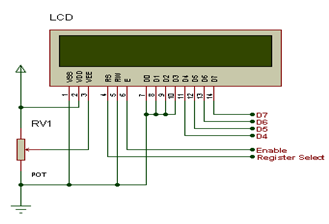
2135_LCD.png

FIGURE: Image of LCD pin outs

The above diagram shows the LCD in nibble (4-bit) mode, and used only 7 pins to interface the LCD. The pins connections are Data (D4-D7) and Enable (E) and Register Select (RS) are used for LCD control pins. The Read/Write (RW) Pin of the LCD was grounded permanently, as we are only writing on the LCD and also connected to the microcontroller in case we need to use it. The LCD contrast is controlled by the Potentiometer RV1. All other unwanted data pins of LCD i.e. D0-D3 are connected to ground.

The LCD pins are connected to the PIC18F452 via PORTD (RD0 - RD3) for data line D4-D7 and PORTE (RE0 -RE2) for E, R/W and RS respectively. I have used only 4bits (nibble) data bus (i.e. D4 - D7) in order to reduce the pin .or line interfacing with the PIC. Pin 15 and 16 are not connected the PIC.


Related Discussions:- Interfacing lcd liquid crystal display

Discuss the overview of multimedia networks, Question 1 Discuss the overvi...

Question 1 Discuss the overview of multimedia networks Question 2 Discuss the types of synchronization in multimedia system >> Basic synchronization issues Content R

What is a color management system, QUESTION a) What is a color manageme...

QUESTION a) What is a color management system? Briefly explain how it works. b) What are the three major factors affecting print permanence? c) Briefly explain three ways

Audio and video, AUDIO AND VIDEO: Audio and video are working as eye and e...

AUDIO AND VIDEO: Audio and video are working as eye and ear of multimedia. Both of them are heavily contributing to any type of multimedia application. Here we discuss something r

What is jpeg, Question 1 What is JPEG? How do you change the quality of a ...

Question 1 What is JPEG? How do you change the quality of a JPEG image? Question 2 What are the advantages and challenges of virtual classroom? Question 3 What do

Definitions of hypermedia, Definitions of Hypermedia It is a term ...

Definitions of Hypermedia It is a term created through Ted Nelson in the year 1970. It utilized as a logical extension of the term hypertext, wherein graphics, video, audi

Why are all resolutions in ratio of 4:3, Q. Why are all resolutions in rati...

Q. Why are all resolutions in ratio of 4:3? The bad news is that almost every monitor can only display upto a maximum of 262,144 colours (i.e.  18 bits/pixel Colour Depth). The

Dda or digital differential analyzer algorithm, DDA or Digital Differential...

DDA or Digital Differential Analyzer Algorithm - Line generation algorithms From the above discussion we get that a Line drawing is accomplished through calculating intermedi

Write Your Message!

Captcha
Free Assignment Quote

Assured A++ Grade

Get guaranteed satisfaction & time on delivery in every assignment order you paid with us! We ensure premium quality solution document along with free turntin report!

All rights reserved! Copyrights ©2019-2020 ExpertsMind IT Educational Pvt Ltd