Input and output devices, Basic Computer Science

Assignment Help:

Input and Output Devices : The most common input devices that you will see in your PC are the keyboard and the mouse.

The keyboard of the computer looks like the keyboard of a typewriter with a few additional keys. One of the most common uses of the computer is as a word processor - basically a sophisticated typewriter that is capable of storing and manipulating text. With a few key strokes the writer can add or delete words and move entire similar sequences or paragraphs from one place to another in the text. Entire books can be written, edited, and printed with the use of computer discs without the manuscript even being committed to paper.

The mouse is a pointing device which is used while working with a display based computer system. It points or selects some area of display on the screen of the monitor and can be moved to another area of the screen. There are several other input devices like scanners, optical pens, joy-sticks that you may see associated with computing systems depending on the kind of requirements.

The output devices of the computer present the results of its work to users. The most common output device is the monitor which looks like a TV screen and the printer.

The input and output devices are so closely related that they are referred to as input/output or 110. The most common I10 devices are floppy discs, compact discs, modem (Modulator-DEModulator) that connect to telephone lines. There are several other devices that can be connected to the computer.

These are called peripherals. I10 peripherals are XY plotters to print graphs, devices that recognise and produce sounds, optical scanners to see text.
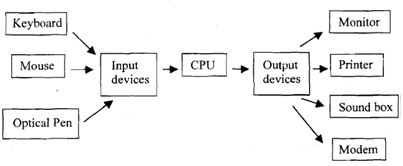
770_Components of a Computing System.png

 Figure : Components of a Computing System.


Related Discussions:- Input and output devices

Text, text graphics audio video

text graphics audio video

Diskless workstations, Diskless workstations:    Most people assume th...

Diskless workstations:    Most people assume that the operating system is stored on a disk that is connected directly to the computer, but this is not necessarily true. If the

Hill climbing - artificial intelligence , Hill Climbing - artificial intell...

Hill Climbing - artificial intelligence: As we've seen, in some particular problems, searching the search path from primly to goal state is the point of the exercise. In anothe

Describe the binary search algorithm, QUESTION 1 Describe the binary se...

QUESTION 1 Describe the binary search algorithm using an example of your own. QUESTION 2 (a) By showing all your workings, give a big-O estimate for f(x) = (x + 1)lo

College management system project, E-R diagram and details for college mana...

E-R diagram and details for college management system

Input and output device, Input and Output device: After having underst...

Input and Output device: After having understood the characteristics relating to CPU and storage media, let us try to learn about I/O aspects of a computer system. Input /outp

HACKER, Briefly explain who a hacker is and what the activities of a hacker...

Briefly explain who a hacker is and what the activities of a hacker are?k question #Minimum 100 words accepted#

What is vpn? list the different types of vpn, Question 1 What is routing? ...

Question 1 What is routing? Explain the principles of routing Question 2 Explain different types of server operations in Enterprise Networking Question 3 Briefly d

Write Your Message!

Captcha
Free Assignment Quote

Assured A++ Grade

Get guaranteed satisfaction & time on delivery in every assignment order you paid with us! We ensure premium quality solution document along with free turntin report!

All rights reserved! Copyrights ©2019-2020 ExpertsMind IT Educational Pvt Ltd