Implement dtc in .net, DOT NET Programming

Assignment Help:

How to implement DTC in .NET

DTC is implemented using the COM+.

Following are some of the steps to implement COM + in .NET:-

1) The "EnterpriseService" namespace has all the classes by which we can implement the DTC in .NET. You have to add reference "EnterpriseService" namespace.
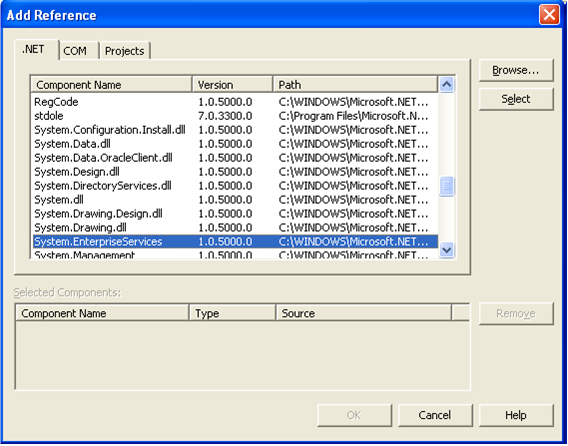
692_implement DTC in .NET.png

2) You must derive your class from "Serviced Component" object.

3) After that you have to define your class with the transaction attribute 

      [ Transaction(TransactionOption.RequiresNew) ]

4) When the class level transaction type is defined.  Now its  time to define at the method level the AutoComplete attribute. Autocomplete attribute explains that if no exception is thrown then mark its part of the transaction as okay. This helps to cut down on the amount of code required. If the implementation sets AutoComplete to false, or omits it altogether, then we would require to manage the transaction manually. For manually control the transaction you will require to use the ContextUtil class & its static members.


public void SampleFunction()

{

try

{

// Do something to a database

// ...

// Everything okay so far Commit the transaction

 ContextUtil.SetComplete();

}

catch(Exception)

 {

// Something went wrong Abort and Rollback the Transaction.

 ContextUtil.SetAbort();

}

}


5)The Component which is  derived from "ServicedComponent" must  be strong named as they run under COM+.

6)Once the classes are compiled using the string name.Register the Component in COM+ services using

 regsvcs c:\DllPath\TransactionComponent.dll

7)The component is registered by using the COM+ explorer.


Related Discussions:- Implement dtc in .net

Improve an existing web application and design, Improve an existing web app...

Improve an existing web application and design (ASP C# Azure Project Description: I want an experience programmer to take my Proof of Concept web app to a professional level.

Stakeholder, Who is a stakeholder? The stakeholder is anyone who has so...

Who is a stakeholder? The stakeholder is anyone who has something to gain or lose as a result of the completion or failure of the project or phase. The stakeholder is not on

Finding average of array elements - c# program, Finding Average of Array El...

Finding Average of Array Elements - C# Program I need assignment help for Finding Average of Array Elements in C#. Can anybody send me there ideas?

What is the difference between sent by val and by ref, What is the differen...

What is the difference between proc. sent BY VAL and By Ref? By val: changes will not be reflected back to the variable. By ref: changes will be reflected back to that varia

Find out the factorial - c# program, Find out the Factorial - C# Program ...

Find out the Factorial - C# Program I've been trying so many codes for this but those codes didn't work well. Please write the code for find out the factorial of an integer nu

Resource files, What are resource files? The Resource files are the fil...

What are resource files? The Resource files are the files which contain program resources. Many programmers think that resource files are used only for storing strings. But you

We''re seeking an it candidate, Project Description: We're seeking an IT...

Project Description: We're seeking an IT candidate with experience to help us optimizely,  Skills required: .NET, C# Programming, ASP, eCommerce, SQL

Benefits & limitation of hidden fields, What are benefits & Limitation of  ...

What are benefits & Limitation of  Hidden fields? The benefits of using Hidden fields are as shown below :- 1)    They are very simple to implement. 2)    As the data is

Main difference between grid layout and flow layout?, What is the main diff...

What is the main difference between Gridlayout and FlowLayout? The Grid Layout provides absolute positioning for the controls placed on the page. The Developers that have their

Which property on a combo box do you set with a column name, Which property...

Which property on a Combo Box do you set with a column name, prior to setting the Data Source, to display data in the combo box? ComboBox.DataValueField = "ColumnName" When

Write Your Message!

Captcha
Free Assignment Quote

Assured A++ Grade

Get guaranteed satisfaction & time on delivery in every assignment order you paid with us! We ensure premium quality solution document along with free turntin report!

All rights reserved! Copyrights ©2019-2020 ExpertsMind IT Educational Pvt Ltd