Frame tag, PHP Web Programming

Assignment Help:

As you can supposition, this tag is utilized for placing an HTML file in the frame created. We have to now tell the browser what to put in each of frame.

Check out the code for all the FRAM ES associated examples. Do we need a <BODY> tag?

<HTML>

<HEAD>

<TITLE>My Frame Page- Master Page</TITLE>

</HEAD>

<FRAMESET COLS="50%,50%">

<FRAME SRC="One.htm">

<FRAME SRC="Two.htm">

</FRAMESET>

</HTML>

You also have to note here that <FRAMESET> is a container tag, and <FRAME> is not. A container tag contain an opening <TAG> and a closing </TAG>.  Thus notice that the <FRAME> tag has no delimiter to terminate it.  Everything is in its attributes.

The <FRAMESET> tag does all the splitting of the page into distinct windows. It also has attributes which indicate how to divide them up. Can we split the page into more than two pieces? Yes, just ensure that you indicate a page to occupy each of the section or the browser will get confused. Look at the code & the output in Figure

<HTML>

<HEAD>

<TITLE>My Frame Page- The Master Page</TITLE>

</HEAD>

<FRAMESET COLS="20%, 20%,20%,20%,20%">

<FRAME SRC="One.htm">

<FRAME SRC="Two.htm">

<FRAME SRC="Three.htm">

<FRAME SRC="Four.htm">

<FRAME SRC="Five.htm">

</FRAMESET>

</HTML>
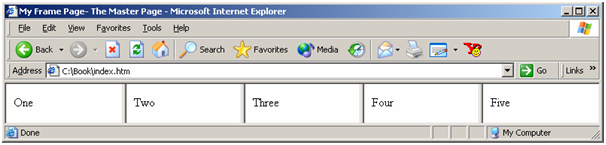
817_Frame Tag.png

Figure: A Web Page with Five Frames

It is just a small step to making the frames all of distinct sizes. Just ensure your arithmetic is correct and that the percentages you indicate add up to 100 or the browser will come up along with its own interpretation.

If we spilt the page into ROWS rather than COLS we get a distinct layout.

<HTML>

<HEAD>

<TITLE>My Frame Page- Master Page</TITLE>

</HEAD>

<FRAMESET ROWS="10%,20%,30%,15%,25%">

<FRAME SRC="One.htm">

<FRAME SRC="Two.htm">

<FRAME SRC="Three.htm">

<FRAME SRC="Four.htm">

<FRAME SRC="Five.htm">

</FRAMESET>

</HTML>

Now Let us take another example with only 2 frames. We can specify 50 to indicate that number of pixels instead of 50 percent. We can also use * instead of a number. The * means whatever is left over.      

<HTML>

<HEAD>

<TITLE>My Frame Page- The Master Page</TITLE>

</HEAD>

<FRAMESET COLS="50,*">

<FRAME SRC="One.htm">

<FRAME SRC="Two.htm">

</FRAMESET>

</HTML>


Related Discussions:- Frame tag

Hyperlinks, Hyperlinks or links are one of the most significant characteris...

Hyperlinks or links are one of the most significant characteristics of web pages. A link moves us from the present page to a destination which is specified in the HTML page. URL

Define a style rule, Define a style rule that defines a font-family, font t...

Define a style rule that defines a font-family, font text color, font-size, and background color for the textarea. The style rules can be placed in a style element in the head of

Html password field, How do you define an HTML password field? Use type ...

How do you define an HTML password field? Use type = password for the form element. This provides a minimal level of visual privacy but the text is submitted in plain text.

Need help interactive weather map using weather data api, Create Interactiv...

Create Interactive Weather Map using Weather Data API Looking for an experienced web developer to create an interactive weather map of the US using the Aeris API. Desired Ski

Frame tag, As you can supposition, this tag is utilized for placing an HTML...

As you can supposition, this tag is utilized for placing an HTML file in the frame created. We have to now tell the browser what to put in each of frame. Check out the code for

Develop a new magento site, As we are establishing a new Magento site with ...

As we are establishing a new Magento site with several large extensions involved, this job is to resolve the various unexpected issues that can occur during set up and testing. As

Web application - front-end for bash tools, Web Application - Front-End for...

Web Application - Front-End for BASH Tools We are in search of a developer or organization capable of building a web application designed to function as a user-rich web front-en

We need help for back-end of laravel framework, We need help for back-end o...

We need help for back-end of Laravel Framework We have a new website/CMS already built on Laravel framework using PHP & AngularJS. We are in need of a freelance programmer to wo

Create the rollover image for navigation buttons, 1. In the Document window...

1. In the Document window, click on the second navigation button cell; then in the Common category of the Objects panel, click on the Insert Rollover Image icon. 2. Within the I

Write Your Message!

Captcha
Free Assignment Quote

Assured A++ Grade

Get guaranteed satisfaction & time on delivery in every assignment order you paid with us! We ensure premium quality solution document along with free turntin report!

All rights reserved! Copyrights ©2019-2020 ExpertsMind IT Educational Pvt Ltd