Fms control-display unit, Basic Computer Science

Assignment Help:

FMS CONTROL-DISPLAY UNIT:

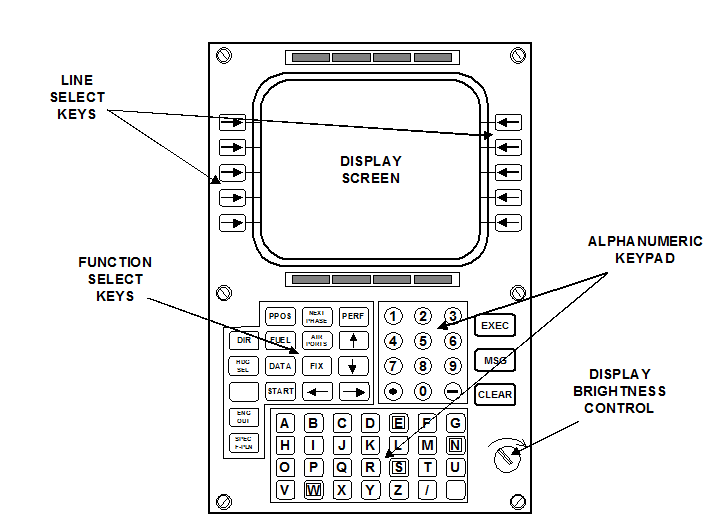
The CDU provides a means for the crew to communicate with the FMC.  It contains pushbutton key controllers and a display screen.  The keys are of two types: - 

1. Alphanumeric keys, which can be used to enter departure and destination points and also Waypoint if not already stored on tape; they will also be used if the flight plan needs to be changed during the flight. 

2. Dedicated keys, which are used for specific functions usually connected with display.  For example, by using the appropriate key the pilot can call up flight plan, Waypoint data, flight progress, present position, etc. 

When, for example, a departure point is entered using alphanumeric keys, the information is often held in a temporary register and displayed to the pilot; this is known as a scratchpad display.  Once the pilot has checked the information is correct, he can enter the data into the computer store by pressing the appropriate dedicated key typically labelled "Load" or "Enter". 
1498_FMS Control-Display Unit.png

Figure shows an FMS Control/Display Unit (CDU).

During a normal flight, the FMS sends navigation data to the EFIS, which can then display a route map on the EHSI.  If the flight plan is altered by the flight crew en-route, then the EHSI map will change automatically.


Related Discussions:- Fms control-display unit

Vdu visual display unit output, VDU (Visual Display Unit) output...

VDU (Visual Display Unit) output Make sure that VDUs are of an appropriate type. They can cause severe eyestrain and tension if you do not check: (a) Colour (

Advantages of computerized record-keeping, Advantages of Computerized Reco...

Advantages of Computerized Record-keeping Less manpower is required for upkeep.  Recording, storing, and retrieving are all much faster: easier and with little practice

Operating system, Ask question describes deadlock avoidance#Minimum 100 wor...

Ask question describes deadlock avoidance#Minimum 100 words accepted#

Assignment 4, Briefly explain all the networking components and devices tha...

Briefly explain all the networking components and devices that are needed to set up a computer network. This is just a brief explanation of devices needed and their reason for usin

Discuss the roles of system analysts in detail, Question 1 Explain the ...

Question 1 Explain the following system design tools in detail System Flowcharts Decision tables Decision trees Organization charts Question 2 Write s

Explain different categories of electronic payment system, Problem 1 Ex...

Problem 1 Explain the different categories of electronic payment system in detail Listing the types and sub types Explanation Problem 2 We know that there a

List and explain different types of media, Question 1 List and explain the...

Question 1 List and explain the ways used to close an MS Word document Question 2 What is MS-Excel? List the steps involved in starting Microsoft Excel Question 3 What i

Data structure, #question.a tree has 0 off springs at each node. if it had ...

#question.a tree has 0 off springs at each node. if it had a label L, what will be the maximum number of nodes that the tree can have. only an expression involving the number of no

Computer network.., what is the difference between internet and world wide ...

what is the difference between internet and world wide web?

Virtual memory, What is virtual memory? How address mapping is done in cach...

What is virtual memory? How address mapping is done in cache memory? Elaborate your answer with examples.

Write Your Message!

Captcha
Free Assignment Quote

Assured A++ Grade

Get guaranteed satisfaction & time on delivery in every assignment order you paid with us! We ensure premium quality solution document along with free turntin report!

All rights reserved! Copyrights ©2019-2020 ExpertsMind IT Educational Pvt Ltd