Find the normalization transformation, Computer Graphics

Assignment Help:

Illustration: Find the normalization transformation N that uses the rectangle W (1, 1), X (5, 3), Y (4, 5) and Z (0, 3) as a window and also the normalized device screen like the viewport.
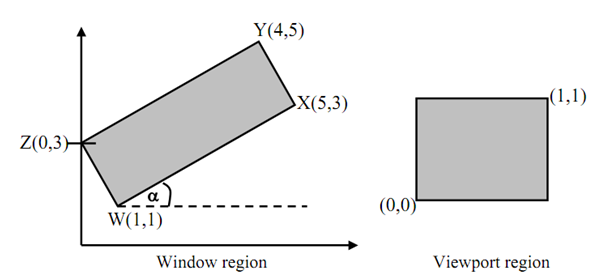
2190_Find the normalization transformation 1.png

Figure: Example Transformations

Currently, we observe that the window edges are not parallel to the coordinate axes. Consequently we will first rotate the window regarding W hence it is aligned along with the axes.

Now, tan α= (3 -1)/(5-1) = 1/2

⇒ Sin α =    1 /√5;   Cos α = 2/√5

Now, we are rotating the rectangle in clockwise direction. Consequently α is negative which is, - α.

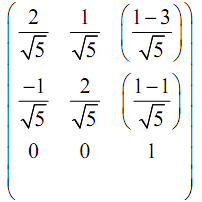
The rotation matrix about W (1, 1):

550_Find the normalization transformation 2.png

[TR.θ]W =

945_Find the normalization transformation 3.png

The x extent of the rotated window is the length of WX:

√(42 + 22) = 2√5

As same, the y extent is length of WZ that is,

√ (12 + 22) =   √5

For scaling the rotated window to the normalized viewport we calculate sx and sy as,

 sx = (viewport x extent)/(window x extent)= 1/2√5

sy = (viewport y  extent)/(window y extent) =   1/√5
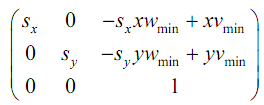
925_Find the normalization transformation 4.png

As in expression (1), the common form of transformation matrix showing mapping of a window to a viewport:

[T] =

Within this problem [T] may be termed as N as this is a case of normalization transformation with,

xwmin = 1                        xvmin = 0

ywmin = 1                        yvmin = 0

 sx = 1/2√5      

 sy =  1/√5

Via substituting the above values in [T] which is N:

N =
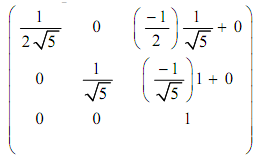
1677_Find the normalization transformation 5.png

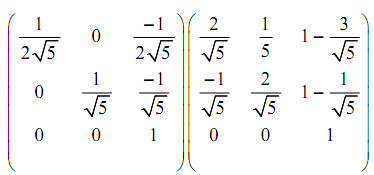
Here, we compose the rotation and transformation N to determine the needed viewing transformation NR.

 NR = N [TR.θ]W =
2096_Find the normalization transformation 6.png


Related Discussions:- Find the normalization transformation

Design a graphical user interface, 1. Implement proper exception handling m...

1. Implement proper exception handling mechanism for this application. 2. Display all data a. Search specific data (depending of the user selection, your application should e

Handling mouse input, When you set up your project, create the class as an ...

When you set up your project, create the class as an "ACM Graphics Program", rather than a plain class. This will perform the necessary preparations for you to use mouse input in y

Basics of animation - computer animation, Basics of Animation - Computer an...

Basics of Animation - Computer animation Historical and traditional methods for production of animation: As we have studied the transformations linked in computer graphics

Types of animation systems - computer animation, Types of Animation Systems...

Types of Animation Systems - Computer Animation We have discussed above about the sequencing of animation is helpful in developing any animation. Such sequencing is more or le

Advantages of gif files, Advantages of GIF Files GIF is the most ex...

Advantages of GIF Files GIF is the most extensively supported graphics format upon the Web. GIFs of diagrammatic images appear better than JPEGs. GIF maintains inte

Bezier curves and surfaces - modeling and rendering, Bezier Curves and Surf...

Bezier Curves and Surfaces We had discussed in the previously that we can create complicated geometries along with the aid of polygon meshes that are further constituted of s

Briefly explain the importance of an adjustment layer, Question : (a) W...

Question : (a) What do you meant by "solo a layer " in Adobe After Effects. Explain briefly how would you perform it. (b) Briefly explain the importance of an adjustment lay

Bezier curves - 2d shape primitives, Bezier curves: Theses are special...

Bezier curves: Theses are special polynomial curves expressed using Bernstein polynomials. Spline curves are simple extensions of Bézier curves composed of two or more polynom

Algorithm scan-line, Algorithm (scan-line): For each scan line perform ...

Algorithm (scan-line): For each scan line perform from step (1) to (3). 1) For all pixels on a scan-line, arrange depth [x]=1.0 i.e. max value and Intensity [x] = background

Write Your Message!

Captcha
Free Assignment Quote

Assured A++ Grade

Get guaranteed satisfaction & time on delivery in every assignment order you paid with us! We ensure premium quality solution document along with free turntin report!

All rights reserved! Copyrights ©2019-2020 ExpertsMind IT Educational Pvt Ltd