Data types - visual basic, Visual Basic Programming

Assignment Help:

DATA TYPES 

The different primitive data types are Boolean, Char, Byte, Date, Decimal, Uinteger, Double, Integer, Long, Sbyte, Short, Single, String, Ulong & Ushort. To declare the variables the DIM statement is used. For illustration to say a variable sum is of integer type, either of the below statements can be used.

Dim sum As Integer

Dim sum%

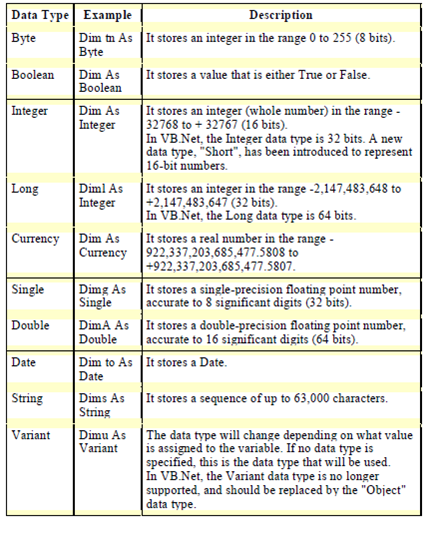
The common syntax for declaring a variable is Dim followed by the variable followed by As keyword followed by the datatype that is again a keyword. The table gives an idea of the other data types.
846_data types.png

Table: The various data types in visual basic

Dim is used for declaring the variables in procedures. Every time the procedure is called, the data stored in the variables declared with this keyword are reset. The Static is used to declare the variables in procedures. Every time the procedure is called, the data stored in the static variables are retained.

Public is used to declare the variables within a module. The variable is accessible to all process in the project.

Private is used to declare the variables within a module. The variable is only accessible to process within the project.

ReDim: The keyword ReDim is used to re-dimension an array.


Related Discussions:- Data types - visual basic

Introduction to visual c++ programming, INTRODUCTION to VISUAL C++ PROGRAMM...

INTRODUCTION to VISUAL C++ PROGRAMMING This section introduces you to develop the applications using VC++. The Single document interface (SDI), multiple document interface (MDI

Error handling in vbscript, While a run-time error takes place, the propert...

While a run-time error takes place, the properties of the Err object are filled with information which uniquely identifies the error & information which can be used to handle it. I

Benefits of using dynamic link library, Benefits of Using DLLs: The dy...

Benefits of Using DLLs: The dynamic linking has the following advantages which are as shown below: It saves memory and decreases the swapping. Many processes can use a s

Associating toolbars for the menu - visual basic, Associating Toolbars for ...

Associating Toolbars for the menu: 1. Insert the tool bar control to your form. 2. Now follow the steps to append the tool bar control to your form. 3. Then, Right Click

Shopping cart, Shopping Cart Purpose – Allows user to browse while keeping ...

Shopping Cart Purpose – Allows user to browse while keeping track of the items in which they will purchase at the end on the order page link and this will give a final price for al

Investment loan program, I have all my program done except the loan part th...

I have all my program done except the loan part that I am having a lot of troubles with

Message box - dialog box in visual basic, Message Box: The Message Box...

Message Box: The Message Box can be specified a title as shown in figure to specify the title for the message box follow by the command given below:  Private Sub Command1_C

Introduction to controls and toolbars, INTRODUCTION TO CONTROLS AND TOOLBAR...

INTRODUCTION TO CONTROLS AND TOOLBARS The Visual Basic programming is an event driven programming. In the form objects the termed controls are placed. We can put the properties

Vbscript variables, A variable is convenient placeholder which refers to a ...

A variable is convenient placeholder which refers to a computer memory location where you can store program information which may change when your script is running. For instance,

Descriptive variable and procedure names, The body of variable or procedure...

The body of variable or procedure name must use mixed case and complete as essential to define its purpose. Additionally, procedure names must begin with a verb, such as CloseDialo

Write Your Message!

Captcha
Free Assignment Quote

Assured A++ Grade

Get guaranteed satisfaction & time on delivery in every assignment order you paid with us! We ensure premium quality solution document along with free turntin report!

All rights reserved! Copyrights ©2019-2020 ExpertsMind IT Educational Pvt Ltd