Data type conversion, PL-SQL Programming

Assignment Help:

Datatype Conversion

At times it is necessary to convert a value from one datatype to another. For e.g. if you want to inspect a rowid, you should convert it to a character string. The PL/SQL supports both the explicit and implicit (automatic) datatype conversion.

Explicit Conversion

To convert the values from one datatype to other, you use the built-in functions. For e.g. to convert a CHAR  value to a DATE   or NUMBER   value, use the function TO_DATE  or TO_NUMBER, respectively. On the contrary, to convert a DATE or NUMBER value to the CHAR value, you use the function TO_CHAR.

Implicit Conversion

When it makes sense, the PL/SQL can convert the datatype of a value implicitly. This permits you to use the variables, literals, and parameters of one type where the other type is expected. In the example shown below, the CHAR variables start_time and finish_ time hold string values representing the number of seconds in the past midnight. The variation between those values must be assigned to the NUMBER variable elapsed_time. And hence, the PL/SQL converts the CHAR values to the NUMBER values automatically.

DECLARE

start_time CHAR(5);

finish_time CHAR(5);

elapsed_time NUMBER(5);

BEGIN

/* Get system time as seconds past midnight. */

SELECT TO_CHAR(SYSDATE,'SSSSS') INTO start_time FROM sys.dual;

-- do something

/* Get system time again. */

SELECT TO_CHAR(SYSDATE,'SSSSS') INTO finish_time FROM sys.dual;

/* Compute elapsed time in seconds. */

elapsed_time := finish_time - start_time;

INSERT INTO results VALUES (elapsed_time, ...);

END;

Before assigning a selected column value to a variable, the PL/SQL will, if necessary then convert the value from the datatype of the source column to the datatype of the variable. This happens, for e.g.  If you select a DATE column value into a VARCHAR2 variable.

Similarly, before assigning the value of a variable to a database column, the PL/SQL will, if necessary then convert the value from the datatype of the variable to the datatype of the target column. If the PL/SQL cannot determine that implicit conversion is required, you get a compilation error. In such situation, you should use a datatype conversion function. The table shows that implicit conversions PL/SQL can do.
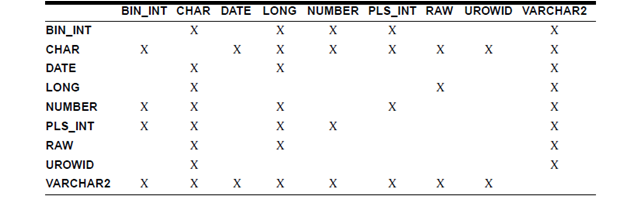
566_data type conversion.png

It is your duty to ensure that the values are convertible. For illustration, the PL/SQL can convert the CHAR value '02-JUN-92' to a DATE value but cannot convert the CHAR value 'YESTERDAY' to a DATE value. Likewise, the PL/SQL cannot convert a VARCHAR2 value containing the alphabetic characters to a NUMBER value.

Implicit versus Explicit Conversion

Normally, to rely on the implicit datatype conversions is a poor programming practice as they can hamper the performance and might change from one software release to the next. Also, the implicit conversions are context sensitive and hence not always predictable. Rather, use datatype conversion functions. In that way, your applications will be easier and reliable to maintain.


Related Discussions:- Data type conversion

Using prior and next - collection method, Using PRIOR and NEXT The PRI...

Using PRIOR and NEXT The PRIOR(n) returns the index number that precede index n in a collection. The NEXT(n) returns the index number which succeed the index n. If n has no pr

Procedures in pl/sql, Procedures   The procedure is a subprogram which...

Procedures   The procedure is a subprogram which performs a specific action. You write procedures using the syntax as shown below: PROCEDURE name [(parameter[, parameter, .

Exception handling, Exception handling In the PL/SQL, a warning or erro...

Exception handling In the PL/SQL, a warning or error condition is known as an exception. The Exceptions can be internally defined (by the run-time system) or user defined. The

Declaring objects in pl/sql, Declaring Objects: You can use the object ...

Declaring Objects: You can use the object types wherever built-in types like CHAR or NUMBER can be used. In the block below, you can declare object r of type Rational. Then, yo

Execute your documentation in oracle, Using research notes and Oracle docum...

Using research notes and Oracle documentation plan and execute an upgrade of an installation of Oracle 10g to Oracle 11g release 1. To do this you must show in screen shots and wri

Using the collection methods, Using the Collection Methods The collecti...

Using the Collection Methods The collection methods below help to generalize the code and make collections easier to use and also make your applications easier to maintain:

Package utl file in pl/sql, UTL_FILE: The Package UTL_FILE permits you...

UTL_FILE: The Package UTL_FILE permits your PL/SQL programs to read & write operating system (OS) text files. It gives a restricted version of the standard OS stream file I/O,

Package specification, The Package Specification The package specificat...

The Package Specification The package specifications contain the public declarations. The scopes of these declarations are local to your database representation and global to t

Obtaining a natural join by specifying the common columns, Obtaining a natu...

Obtaining a natural join by specifying the common columns Synatax: SELECT * FROM IS_CALLED JOIN IS_ENROLLED_ON USING ( StudentId ) However, a named columns join doe

Parameter & keyword description-execute immediate statement, Parameter and ...

Parameter and Keyword Description: dynamic_string: This is a string variable, literal, or expression which represents a SQL statement or the PL/SQL block. define_vari

Write Your Message!

Captcha
Free Assignment Quote

Assured A++ Grade

Get guaranteed satisfaction & time on delivery in every assignment order you paid with us! We ensure premium quality solution document along with free turntin report!

All rights reserved! Copyrights ©2019-2020 ExpertsMind IT Educational Pvt Ltd