Create a gantt chart for scheduling algorithms, Operating System

Assignment Help:

Question:

(a) The following table (table 1.0) gives the length of the CPU burst time in milliseconds of processes P1 to P4. Assume the processes arrived in the order P1, P2, P3, P4 all at time 0.
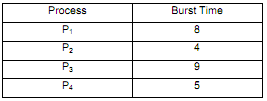
414_Create a Gantt chart.png

Create a Gantt chart for each of the scheduling algorithms below showing when each process will be scheduled, and also determine the average waiting time for each of them.

I. First-Come-First-Server (FCFS)
II. A non preemptive Shortest Job First (SJF)

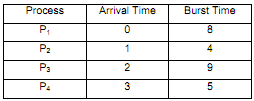
(b) Consider table 2.0, below:
1212_Create a Gantt chart1.png

Assume the processes arrived in the order P1, P2, P3, P4 at time shown and need the indicated burst time (both in milliseconds). Create a Gantt chart for the preemptive Shortest Job First (SJF) scheduling algorithm showing when each process will be scheduledand also determine the average waiting time for each process.

(c) Compare the average waiting time from part a (ii) for the nonpreemptive SJF algorithm with the average waiting time in part b for the preemptive version of SJF. Which algorithm results in the minimum average waiting time?

(d) The SJF algorithm tries to reverse the bias against short jobs found in FCFS scheme. Explain how is this achieved and what new problem is then inherent in the SJF algorithm in terms of processes? Is there any way to solve this inherent problem in the SJF algorithm?


Related Discussions:- Create a gantt chart for scheduling algorithms

Time-Sharing Operating System, Advantages and disadvantages of time-sharing...

Advantages and disadvantages of time-sharing operating system

Microsoft, Discuss the high barriers to entry in the market for PL operatin...

Discuss the high barriers to entry in the market for PL operating systems

Explain drawbacks of fixed partitioning, The drawbacks of fixed partitionin...

The drawbacks of fixed partitioning are: The number of partitions are précised at system generation time limits the number of active processes in the system. For the re

Explain the facilities of a debug monitor, Facilities of a Debug Monitor ...

Facilities of a Debug Monitor Facilities of a debug monitor are like this: Setting breakpoints in the program Initiating a debug conversation while control reaches

Define a set of methods that allow executing a program, A set of methods th...

A set of methods that allow executing a program which is not completely in memory   is called A set of methods that allow executing a program which is not completely in memory

Designing issues in a network -transparency, Transparency Users mus...

Transparency Users must be able to access remote resources as though these resources were local. Transparency should as well promote user mobility. Users must be allowed

Use of c and c++, One reason to learn C and C++ is simply that so much soft...

One reason to learn C and C++ is simply that so much software is written in these languages. A related, butmore fundamental reason, is that C and C++ are relatively low-level, allo

Explain the steps in deadlock recovery, Explain the steps in deadlock recov...

Explain the steps in deadlock recovery. a)      Exterminate off all processes involved - drastic. b)      Exterminate off one at a time till deadlock gone - select a victim.

Binary arithmetic, The principle is that of ordinary addition; however reme...

The principle is that of ordinary addition; however remember the highest number is 1.   Calculate the following:                             11001 +                           11

Explain the exitthread function used in the windows nt, Explain the ExitThr...

Explain the ExitThread Function used in the Windows NT ExitThread(ExitCode) The ExitThread( ) call is made to end the currently running thread. If the current thread is th

Write Your Message!

Captcha
Free Assignment Quote

Assured A++ Grade

Get guaranteed satisfaction & time on delivery in every assignment order you paid with us! We ensure premium quality solution document along with free turntin report!

All rights reserved! Copyrights ©2019-2020 ExpertsMind IT Educational Pvt Ltd