Convert ascii code to its bcd equivalent, Computer Engineering

Assignment Help:

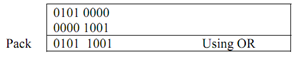
Convert ASCII code to its BCD equivalent. This can be achieved by simply replacing bits in upper four bits of byte by four zeros. For illustration the ASCII '1' is 32h = 0010B. By making upper four bits as 0 we obtain 0000 0010 that is 2 in BCD. Number attained is known as unpacked BCD number. Upper 4 bits of this byte is zero. So upper four bits can be used to store another BCD digit. The byte so obtained is known as packed BCD number. For illustration an unpacked BCD number 59 is 00000101 00001001 which is 05 09. Packed BCD will be 0101 1001 which is 59.

The algorithm to convert two ASCII digits to packed BCD can be defined as:

Convert first ASCII digit to unpacked BCD.

Convert second ASCII digit to unpacked BCD.

1110_Convert ASCII code to its BCD equivalent.png

Move first BCD to upper four positions in byte.

702_Convert ASCII code to its BCD equivalent1.png

Pack two BCD bits in one byte.

506_Convert ASCII code to its BCD equivalent2.png

The assembly language program for the above can be written in the below manner.


; ABSTRACT                         Program produces a packed BCD byte from 2 ASCII 

                                                ; encoded digits. Assume the number as 59.

                                                ; The first ASCII digit (5) is loaded in BL.

                                                ; The second ASCII digit (9) is loaded in AL.

                                                ; The result (packed BCD) is left in AL.

; REGISTERS                        ; Uses CS, AL, BL, CL

; PORTS                                  ; None used

CODE    SEGMENT

            ASSUME                    CS:CODE

START:  MOV BL,                '5'; Load first ASCII digit in BL

   MOV AL,                            '9'; Load second ASCII digit in AL

   AND BL,                             0Fh; Mask upper 4 bits of first digit

   AND AL,                             0Fh; Mask upper 4 bits of second digit

   MOV CL,                            04h; Load CL for 4 rotates 

   ROL BL,                              CL; Rotate BL 4 bit positions

   OR AL,                                BL; Combine nibbles, result in AL contains 59 

                                                ; As packed BCD

CODE ENDS

END START

Discussion:

8086 doesn't have any instruction to swap lower and upper 4 bits in a byte so we need to use rotate instructions that too by 4 times. Out of two rotate instructions RCL and ROL we have chosen ROL as it rotates the byte left by one or more positions whereas RCL moves MSB into carry flag and brings original carry flag in the LSB position and that is not what we want.


Related Discussions:- Convert ascii code to its bcd equivalent

Quick sort exhibit its worst-case behaviour, In which input data does the a...

In which input data does the algorithm quick sort exhibit its worst-case Behaviour? The Quick Sort method exhibits its worst-case behavior when the input data is " Already Comp

Define the Load address for the first word of the program, Load address for...

Load address for the first word of the program is called? Ans. load address origin is known as load address for the first word of the program.

How the information can be stored, In a RAM, information can be stored ? A...

In a RAM, information can be stored ? Ans. RAM is used by the user, number of times.

Determine the values of the output of the logic gates, Write the values of ...

Write the values of the C output for the following gates: For a(n) ________ gate, the output is zero if any of the inputs are equal to  one. For a(n) ________ gate ,the

Difference between a null pointer and a void pointer, A NULL pointer is a p...

A NULL pointer is a pointer of any type whose value is zero. A void pointer is a pointer to an object of an unknown type, and is guaranteed to have sufficient bits to hold a pointe

What is meant by opening a data file, What is meant by opening a data file ...

What is meant by opening a data file A data file is a file that can be read from or written to. Data files are particularly useful when large amounts of data are involved. Each

Explain simple telephone communication system, Explain simple telephone com...

Explain simple telephone communication system with circuit and equation of current flow in microphone? Simple Telephone Communication: In the simplest type of a telephone cir

Explain mdr and mar, Explain MDR and MAR. The data and address lines of...

Explain MDR and MAR. The data and address lines of the external memory bus linked to the internal processor bus by the memory data register, MDR and the memory address register

Describe distributed object model, Question 1 Give a brief explanation on m...

Question 1 Give a brief explanation on message oriented middleware Question 2 Describe Distributed object model Question 3 Explain File systems in a distributed computing Env

Hard and soft real time systems, Q. Hard and Soft Real Time Systems? ...

Q. Hard and Soft Real Time Systems? Hard Real Time Systems that guarantee critical tasks are completed on time. Soft Real Time Systems that are less restrictive type o

Write Your Message!

Captcha
Free Assignment Quote

Assured A++ Grade

Get guaranteed satisfaction & time on delivery in every assignment order you paid with us! We ensure premium quality solution document along with free turntin report!

All rights reserved! Copyrights ©2019-2020 ExpertsMind IT Educational Pvt Ltd