Conditionals - sql, PL-SQL Programming

Assignment Help:

Conditionals - SQL

At first sight SQL does not appear to have a single operator for expressing logical implication. In this respect it would be in common with most programming languages, including Tutorial D. However, standard SQL defines a partial ordering for its three truth values, under which false is deemed to precede true. Thus, the comparisons p < q, p > q, p <= q, and p >= q are all supported in standard SQL (in addition to p = q, of course).

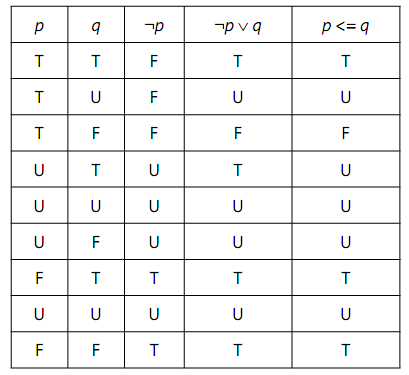
it is noted that in 2VL p → q is equivalent to ¬ p ∨ q. Study of Figure 3.5 reveals that ¬ p ∨ q does indeed equate to p → q when neither operand is unknown, and the same is true of p <= q! (It is the pronunciation, "is less than or equal to", rather than "implies", that led to my observation that SQL appears to include direct support for a 3VL form of implication by accident.)
1570_Conditionals - SQL.png

Figure: The SQL Truth Tables for ¬ p∨ q and p <= q

Note, however, that p <= q is not equivalent to ¬ p ∨ q. Intuitively, we understand that "p implies q" is true whenever q is true. This holds for ¬ p ∨ q but not for p <= q, as the row for p = U and q = T shows. The U in the last column for that row arises from SQL's general rule that whenever an operand of a comparison is NULL, the result is unknown-and NULL, when it is the result of evaluating a Boolean expression, is considered synonymous with unknown. In fact, Figure gives a demonstration of the fact that SQL is not always faithful to its own concept, that NULL represents "a value exists here but we don't know which value". What U really means when it appears in the column for p <= q is that <= is undefined for that particular pair of truth values.


Related Discussions:- Conditionals - sql

Variable declaration - sql, Variable Declaration - SQL SQL's support f...

Variable Declaration - SQL SQL's support for variables is very similar to Tutorial D's, except that the syntax for creating persistent  variables-base tables-is quite differen

Do you know anyone that can do this type of coding or not?, Task 2 [12 mark...

Task 2 [12 marks] Write the package body for the following package specification (the detailed description of each function and procedure is provided in the appendix below). Place

Parameter aliasing, Parameter Aliasing   To optimize the subprogram ca...

Parameter Aliasing   To optimize the subprogram call, the PL/SQL compiler can decide between the two techniques of the parameter passing. With the by-value techniques, the v

Effects of null, Effects of NULL The numeric variable X, perhaps of ty...

Effects of NULL The numeric variable X, perhaps of type INTEGER, might be assigned NULL. In that case the result of evaluating X + 1 is NULL, and so SET Y = X + 1 assigns NULL

Parameter and keyword description - open-for statement, Parameter and Keywo...

Parameter and Keyword Description: cursor_variable_name: This identifies a cursor variable or the parameter formerly declared within the present scope. host_cursor_va

Comparison operators - sql operators, Comparison Operators Usually, yo...

Comparison Operators Usually, you use the comparison operators in the WHERE clause of a data manipulation statement to form the predicates, that compare one expression to anot

Parameter and keyword description - sql cursor, Parameter and Keyword Descr...

Parameter and Keyword Description: SQL: This SQL is the name of the implicit SQL cursor. %FOUND: This attribute results TRUE if an INSERT, DELETE, or UPDATE state

Sql outer join, SQL outer join SELECT * FROM IS_CALLED NATURAL LEFT...

SQL outer join SELECT * FROM IS_CALLED NATURAL LEFT JOIN IS_ENROLLED_ON Note that adding LEFT to an invocation of CROSS JOIN has no effect unless the right-hand operand

%rowcount - implicit cursor attributes, %ROWCOUNT The %ROWCOUNT yields...

%ROWCOUNT The %ROWCOUNT yields the number of rows affected by the INSERT, UPDATE, or DELETE statement, or returned by a SELECT INTO statement. The %ROWCOUNT yields zero when a

Using lock table, Using LOCK TABLE You use the LOCK TABLE statement to...

Using LOCK TABLE You use the LOCK TABLE statement to lock the whole database tables in the specified lock mode so that you can share or deny the access to them. For illustrati

Write Your Message!

Captcha
Free Assignment Quote

Assured A++ Grade

Get guaranteed satisfaction & time on delivery in every assignment order you paid with us! We ensure premium quality solution document along with free turntin report!

All rights reserved! Copyrights ©2019-2020 ExpertsMind IT Educational Pvt Ltd