Best practice while implement globalization & localization, DOT NET Programming

Assignment Help:

What are the best practices while implementing globalization and localization?

The best methods while developing international language support software are shown below:-

1) Do not hardcode the strings or user interface resources.

2) make sure that your application depends on Unicode.

3) Whenever you read or write data from different encoding make sure you use the namespace System.text . Most of the programmers assume ASCII data.

4) While testing test it with the actual international data and environments.

5) Whenever we manipulate the data for instance numbers, dates or currency make sure that you are using the culture-aware classes defined in the namespace System.Globalization .

The table below specifies in more detail about the functionality and the classes to be used to achieve the same.
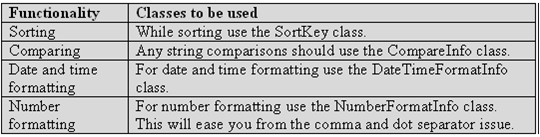
1337_Globalization and localization.png

Figure: - Functionality and classes used

1) If the security decision is based on the result of a string comparison or case change operation, perform a culture-insensitive operation by explicitly specifying the CultureInfo.InvariantCulture property. This method ensures that the result is not affected by the value of CultureInfo.CurrentCulture.

2) Move all your localizable resources to separate the DLL's.

3) Avoid using the images and icons that contain text in your application. They are costly to localize.

4) Allow plenty of rooms for the length of the strings to expand in the user interface. In some languages, phrases can need 50-75 percent more space.

5) Using the System.Resources.The ResourceManager class to retrieve resources based on culture.

6) Explicitly set the CurrentUICulture &  CurrentCulture properties in your application. Don't rely on the defaults.

7) Be aware that you can specify the following 3 types of encodings in ASP.NET:

  • The requestEncoding specifies the encoding received from the client's browser.
  • The responseEncoding specifies the encoding to send to the client browser. In most cases, this should be same as the requestEncoding.
  • The FileEncoding specifies the default encoding for .aspx, .asmx, and .asax file parsing.

Related Discussions:- Best practice while implement globalization & localization

Explain Add References Dialog Box, What is the difference between "using Sy...

What is the difference between "using System.Data;" and directly adding the reference from "Add References Dialog Box"? When you compiles a program using command line, u add th

ASP.NET, What is the Append Format for FileUpload Control in ASP.Net? What ...

What is the Append Format for FileUpload Control in ASP.Net? What it specify?

Solving some issues about traffic jam, Computer programming Project Desc...

Computer programming Project Description: Solving some issues about traffic jam Skills required: C# Programming, Java, C++ Programming, PHP, Software Architecture

Want to generate random numbers, want to generate random numbers between 1...

want to generate random numbers between 1-15 and no one should repeat until all numbers have come once....

Need help to develop a job portal, Job Portal A one-stop explanation to ...

Job Portal A one-stop explanation to all your needs. Consist of employee as well as employer login accounts. Employee capable to look for jobs. Employer capable to post jobs.

Monitor object, What is a monitor object? Monitor objects are used to e...

What is a monitor object? Monitor objects are used to ensure that a block of code runs without being interrupted by code running on other threads. In other words, code in other

Reading strings from the keyboard, Reading strings from the keyboard   ...

Reading strings from the keyboard   using System; class Prog3_1 {       public static void Main()   {    Console.Write ("Enter Your First Name : "); // Displaying to writ

what is ildasm, ILDASM When it comes to the understanding of the inter...

ILDASM When it comes to the understanding of the internals nothing can beat ILDASM. ILDASM  converts all the exe or dll into IL code. To run ILDASM you have to go to "C:\Progra

For looops, 25 16 25 9 16 25 4 9 16 25 ...

25 16 25 9 16 25 4 9 16 25 1 4 9 16 25

I want to develop a windows 8.1 application, I want to develop a Windows 8....

I want to develop a Windows 8.1 Application Project Description: Media Player App Development for Windows 8.1 platform with brilliant UI, flexible controls and easy to use.

Write Your Message!

Captcha
Free Assignment Quote

Assured A++ Grade

Get guaranteed satisfaction & time on delivery in every assignment order you paid with us! We ensure premium quality solution document along with free turntin report!

All rights reserved! Copyrights ©2019-2020 ExpertsMind IT Educational Pvt Ltd