Anti aliasing - modeling and rendering, Computer Graphics

Assignment Help:

Anti Aliasing - Modeling and Rendering

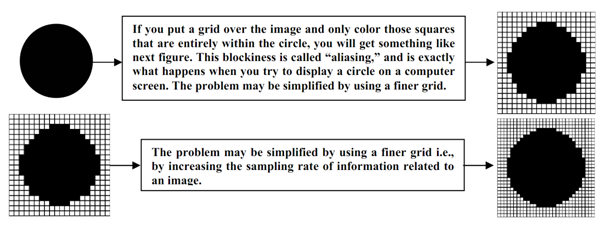
It is a method for enhancing the realism of an image through eliminating the jagged edges from it. Such jagged edges or "jaggies", appear since a computer monitor has square pixels, and these square pixels are inadequate for displaying lines or curves which are not parallel to the pixels and the other reason is low sampling rate of the image information, that in turn cause such jaggies quite same to star casing discussed in previous under DDA algorithm. For better understanding, get the subsequent image of darkened circle as:
2303_Anti Aliasing - Modeling and Rendering.png

It is impossible to completely remove aliasing since computers are digital discrete in nature. Though, it is not impossible to minimize aliasing, the solutions utilized by ray tracers today engage treating all pixels as a finite square area that, in fact as they are, quite than as a mere point on the screen. Conversely, the pixel must not be taken as a point or area although should be taken as a sample of image information as higher the sampling is lesser the aliasing is. Here let us discuss how suitably the sampling can be complete: Rays are fired in the scene by the centers of the pixels and the intensities of adjacent rays are evaluated. If they be different by several pre-determined amount, more rays are fired in the surfaces of the pixels. The intensities of each ray shot in a specified pixel are then averaged to determine a color which better fits what would be expected at such point.

Note: Do not treat a pixel like a square area, when this does not generate correct filtering behavior, actually a pixel is not a point, although it is a sample of information to be displayed.

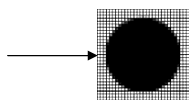
Anti-aliasing, it assists eliminate jagged edges and to create an image seem more realistic. Continuing the above illustration, the anti-aliased circle might, after that be represented
2214_Anti Aliasing - Modeling and Rendering 1.png


Related Discussions:- Anti aliasing - modeling and rendering

Introduction of 2-d and 3-d transformations, Introduction of 2-D and 3-D  ...

Introduction of 2-D and 3-D  Transformations In this, the subsequent things have been discussed in detail as given below: Different geometric transformations as transla

Introduction of curves and surfaces, Introduction of Curves and Surfaces ...

Introduction of Curves and Surfaces This section has covered the methods of generating polygons, closed and curves surfaces. Under those methods we have discussed different ty

Open Gl, Write a program in C/C++ using OpenGL to create (without using bui...

Write a program in C/C++ using OpenGL to create (without using built in function) a square by implementing shear algorithm along 1. X-axis, 2.Y-axis.

Input and hardcopy devices - 2d shape primitives, Input and Hardcopy Device...

Input and Hardcopy Devices  This section gives a brief introduction to the functioning of some well known input and hardcopy devices. Input devices include keyboard, mouse, sca

Explanation of light source by a luminance, Explanation of light source by ...

Explanation of light source by a luminance Explanation of any light source by a luminance the factors identified as: Light source explained by a luminance 1)   All color as

Write short notes on rendering bi-cubic surface, Write short notes on rende...

Write short notes on rendering bi-cubic surface patches of constant u and v method?  The simple way is to draw the iso-parmetric lines of the surface. Discrete approximations t

Transformation, Define transformation. Explain all basic transformation

Define transformation. Explain all basic transformation

Important notes for negative accelerations, Important Notes for Negative Ac...

Important Notes for Negative Accelerations Note : Having projections of points on curve, above Y axis we will obtain a pattern similar to figure 8 that is needed to produce ne

Briefly explain how you could create the gun barrel effect, Question 1: ...

Question 1: (a) Describe what you understand by Rotoscoping in Graphic effects. Give details how Rotoscoping could be achieved in After Effects CS3. (b) Using one algorithm

Write Your Message!

Captcha
Free Assignment Quote

Assured A++ Grade

Get guaranteed satisfaction & time on delivery in every assignment order you paid with us! We ensure premium quality solution document along with free turntin report!

All rights reserved! Copyrights ©2019-2020 ExpertsMind IT Educational Pvt Ltd